Turn binge-watching into your
last language class
Sign in for a free 3-day Pro trial — no credit card required
Dual subtitles, prev/next sentence, sentence replay & hotkeys (A/S/D) available without signing in

Language isn't learned. It's absorbed.
Children never memorize vocabulary or study grammar rules. They simply exist in a consistent environment, hearing familiar voices repeat familiar things — until sound connects to meaning on its own. That's how language acquisition actually works.
vocabulary first → grammar next → speaking last
Listen a lot first → speak only after enough input → reading and writing follow
Three Proven Language Methods, Powered by Tech
[100LS Exclusive]Shadowing & Original Audio Comparison
Shadowing practice is all about immediate feedback. Press 'S' to infinitely replay the current sentence. With auto-pause, the system waits for you to finish recording, then toggles between your pronunciation and the actor's side-by-side. Spot differences instantly.
[Never Study English]AI Context-Aware Parser
Hover over any word to see only the definition that fits the current context, without the dictionary noise. Turn on 'Monolingual Mode' to let the AI rewrite tough lines in the target language, leaving no translation crutch.
[How to Conquer an English Book?]Listening & Word Reordering
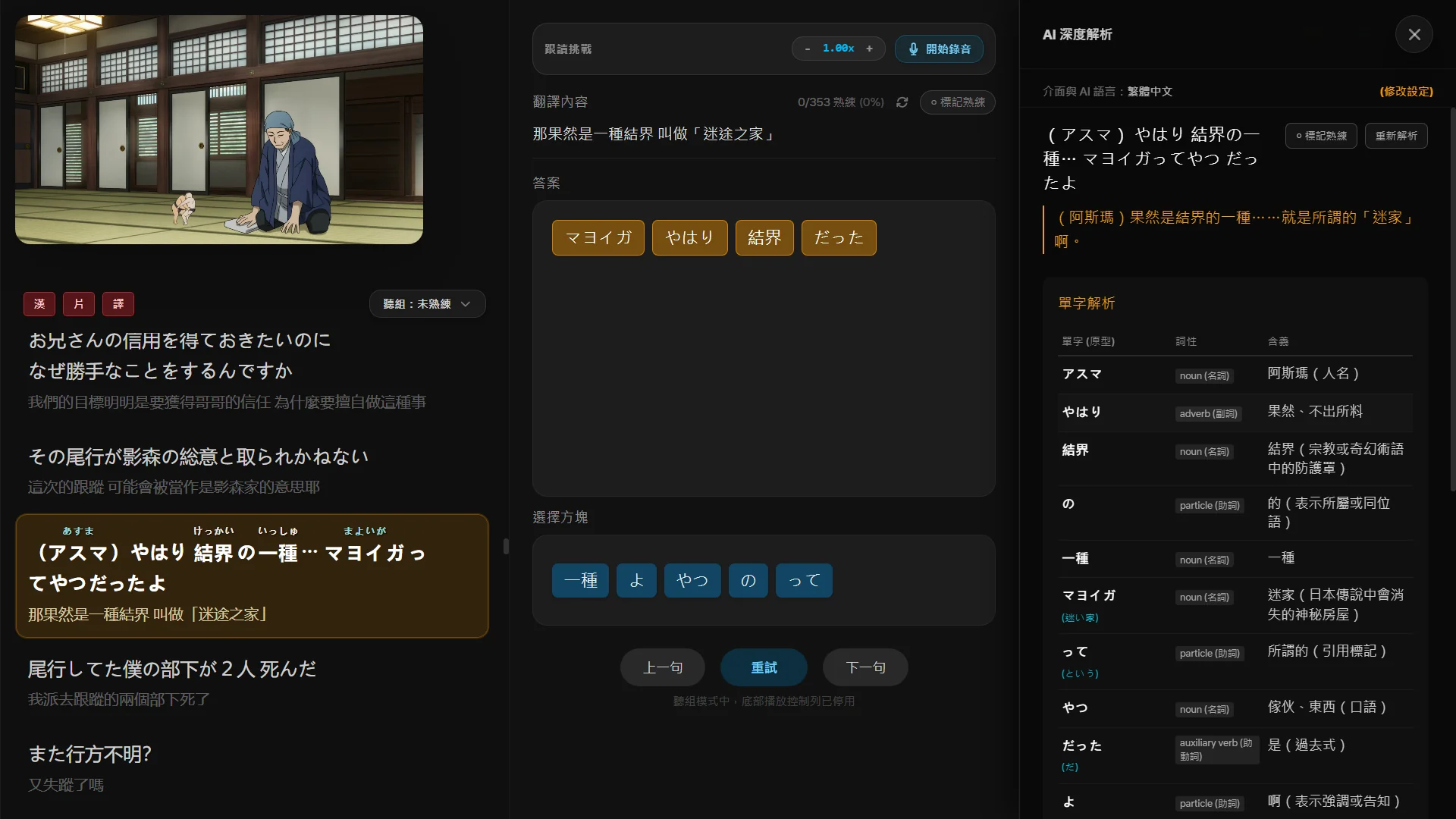
Dialogue lines are broken down into scrambled word blocks. Replay the audio, match what you hear to the blocks on screen, and rebuild the sentence. After a few rounds, native word order will start to feel natural.
Extreme Customization for Japanese & English
Intuitively master Japanese grammar and conjugation
- Smart Furigana & Hiragana annotation: Automatically marks Hiragana above Kanji and supports Katakana conversion. Can be toggled on/off to keep subtitles clean.
- Grammar base form recovery: For complex verb conjugations (causative, passive, conditional, etc.), the AI automatically extracts and restores the root dictionary form.
- Full-scene subtitle capture: Captures low-voice dialogues, narration, or background text perfectly, ready for repeat listening and AI analysis.
Forget rote vocabulary and phrases, understand native context
- Phrasal verb & idiom parsing: Automatically detects and extracts English idioms and phrases, providing context-specific meanings.
- Standard IPA phonetics: Comprehensive International Phonetic Alphabet (IPA) annotations are provided in word analysis to refine your pronunciation and shadowing accuracy.
- Sentence structure & grammar insight: Breaks down grammatical relationships for complex sentences, providing easy-to-understand explanations and usage examples.
Product Screenshots & Features
The actual interface and operations of ImmerseFlow's two modes and AI system.
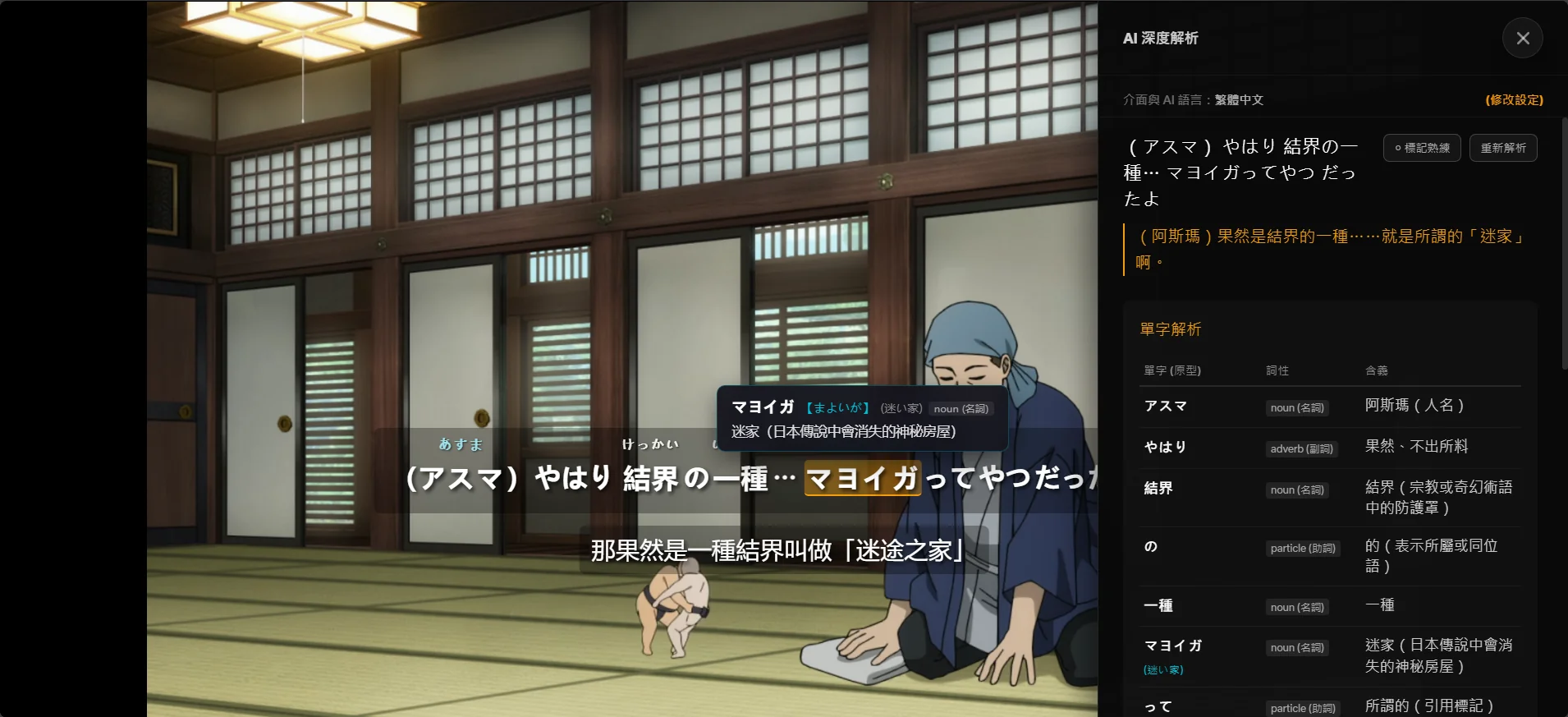
Clean and Seamless Native Binge-Watching
Injects synchronized target and native dual subtitles directly into Netflix & YouTube native players. The native layout renders clean text without clunky overlays, integrated with hotkeys and player controls to ease your transition into listening adaptation.

Frequently Asked Questions (FAQ)
What is ImmerseFlow?
ImmerseFlow is an immersive language learning extension for Netflix and YouTube. By combining synchronized dual subtitles, context-based AI vocabulary analysis, and sentence reordering games, it helps you expand your vocabulary and comprehension while watching your favorite shows.
What features are included in Pro membership?
Free users can access basic dual subtitles and native player layouts. Pro users unlock the exclusive 'Learning Mode' interface (featuring complete interactive transcripts and layout panels), context-aware 'AI Parser' (giving root base lemmas and sentence-specific meanings), 'Word Scramble Games', 'Shadowing Voice Recording', and all future advanced features and platform adapters.
Can ImmerseFlow only be used to learn Japanese or English?
No! Our dual subtitle system depends entirely on the native subtitles provided by Netflix or YouTube. As long as the platform offers them, you can pair any languages you want. For advanced features like AI context-aware parsing and grammar analysis, it is divided into two parts: 1. Supported Target Learning Languages (Video Dialogues): The AI currently supports analyzing and parsing Japanese, English, Korean, Spanish, German, and French dialogues. 2. Translation & Explanation Medium (Output Language): The AI's parsed analysis, grammar explanations, and translations will be rendered in the 'Interface & AI Language' of your choice (supporting Traditional Chinese, Simplified Chinese, English, Japanese, and Korean), allowing you to study foreign grammar in a language you are most comfortable with.
Are there any limits on AI translation requests?
Yes. Because deep AI parsing consumes cloud server resources, Pro accounts receive a fair-use quota of 20 new AI requests per day (for analyzing brand-new sentences that haven't been parsed before). However, browsing existing analysis results from the global community cache is completely UNLIMITED and does not consume your quota. As the community database grows, popular shows will have ready-made results instantly loaded without waiting.
Is the 20 daily AI requests quota enough?
Yes, it is more than enough! 20 new requests per day accumulate to 600 per month and 7,200 per year, which is plenty for deep language learning. Most importantly, once any dialogue line has been parsed by anyone in the community, it is saved to the 'Global Cache'. You can view these cached analysis results unlimited times without consuming any quota. As the community database grows, most common lines will load instantly, leaving your daily quota primarily for brand-new, complex sentences.
Why use AI parsing instead of a standard dictionary?
Standard dictionaries often list every definition for a word, including irrelevant ones, which creates distracting noise and increases memory overload. ImmerseFlow uses AI to analyze the exact context of the current sentence, showing only the most appropriate definition and part of speech for the word in that specific dialogue. This filters out over 90% of dictionary noise, enabling you to learn and understand new words intuitively like a native speaker.
What is the subscription price and payment method?
We offer an annual Pro subscription for USD $38/year, and all newly registered accounts enjoy a 3-day full-feature free trial. All transaction processes are handled securely by Paddle (our Merchant of Record), supporting major credit cards, Apple Pay, and Google Pay.
How do I request a refund?
We offer a 14-day money-back guarantee. If you are not satisfied with our service for any reason within 14 days of purchase, simply email us at support@immerseflow.app and we will issue a full refund immediately.
Why doesn't ImmerseFlow support YouTube auto-generated (ASR) subtitles?
YouTube's auto-generated (ASR) captions are produced by speech recognition and often suffer from inaccurate timestamps, missing punctuation, and inconsistent sentence boundaries. Our dual-subtitle weaving engine relies on precise timing and clean sentence segmentation to pair translations line-by-line. Additionally, features like single-sentence replay, sentence scramble games, and shadowing recording all depend on accurate per-sentence timestamps — which ASR subtitles cannot reliably provide. For the best experience, we recommend selecting manually created subtitles on YouTube.
Why are subtitles missing or unavailable on some YouTube videos?
Subtitles are provided by the video creator — not by ImmerseFlow. If a video has no subtitles enabled by its uploader, our extension cannot display dual subtitles for it. You can check available subtitle tracks by clicking the gear icon (⚙) on YouTube and looking under "Subtitles/CC." Even when native subtitles exist, subtitle interception may occasionally fail due to timing race conditions when switching between videos (YouTube is a single-page app), ASR-only subtitle tracks being automatically filtered out, or content-matching failures between paired languages. If this happens, try toggling the extension off and on, re-selecting the dual subtitle languages, or refreshing the page.
Which browser is recommended for ImmerseFlow? Can I use Microsoft Edge?
For the most seamless and distraction-free learning experience, we **highly recommend using Brave Browser (our primary development and testing environment) or Google Chrome**. **We strongly discourage using Microsoft Edge.** Although Edge is based on the Chromium engine, Microsoft has heavily customized its underlying media playback and shortcut key handling. This causes ImmerseFlow's core features—such as 'Previous Sentence (A)', 'Replay (S)', and 'Next Sentence (D)'—to **fail or lag constantly on Edge**. We have tried numerous technical adjustments, but Edge's restrictions prevent these features from working reliably. To keep your study flow smooth and uninterrupted, please use Brave or Chrome for Netflix and YouTube.